Recent Posts
More on the botnet arrest in Spain
- laura
- Apr 12, 2017
Yesterday I talked about Peter Yuryevich Levashov being arrested in Spain on a US warrant. That warrant and other accompanying docs are unsealed and available on the DOJ website. The arrest was also mentioned on the Rachel Maddow show last night (video).
There are quite a few people, including Rachel Maddow, speculating that this is somehow related to the Russian interference in the recent US elections. As many have pointed out, Levashov and his botnet were involved in spreading fake news during the 2012 elections in Russia.
I don’t know. There may be some connection, it does appear botnets were involved in some of the fake news events during the past election season. None of the docs presented by the Justice Department mention the election. We know that the DOJ investigates botnets, particularly those doing more than just spread spam. This isn’t the first time they’ve taken action against someone running a botnet. It could just be that they finally knew he was in a country that would act on a US warrant. It could be it was just time.
Or, this botnet could be part of the election investigation. I don’t think we really have enough information to go either way.
Botnet herder / spam kingpin arrested
- laura
- Apr 10, 2017
Via Krebs on Security, a russian named Pyotr Levashov has been arrested in Spain. According to news reports (NY Times, Reuters) the arrest happened in response to a warrant issued by the US, but no details were given as to what he was being charged with. The DoJ says the case is currently under seal and will not comment on charges.
There is widespread agreement that this person is involved in major spamming operations. He’s one of Spamhaus’ Top 10 spammers (ROKSO listing). He’s been implicated in fraud during the 2012 elections in Russia. Some reports are speculating that he was involved in the hacking of the 2016 elections here in the US, but there’s no current evidence that’s true.
March 2017: The Month in Email
- laura
- Apr 7, 2017
It’s that time again… here’s a look at our last month of blog posts. We find it useful to recap each month, both to track trends and issues in email delivery and to provide a handy summary for those who aren’t following along breathlessly every single day. Let us know if you find it useful too!
As always, I wrote about email filters. It’s so important to recognize that filters aren’t arbitrary — they’re detailed instructions that help meet specific user needs, and the more you are cognizant of that, the better you’ll be able to work with them. Additionally, filters aren’t perfect and likely never will be. False positives and false negatives are frustrating, but as long as spam is still a viable business for spammers, they’ll continue to figure out how to work around filters. As such, we can’t expect filters to be 100% accurate in determining what constitutes wanted and unwanted mail.
Part of this, of course, is due to the problem of fraudulent signups. Companies aren’t particularly vigilant about address acquisition and hygiene, and as a result, they’ll claim you “signed up” for their email when you did not. Some people believe that a confirmed opt-in (COI) will solve this problem, but our experience is companies are reluctant to leave revenue on the table, and that they will continue to mail to addresses that have not confirmed.
Address sharing and co-reg is also part of the problem. As we saw in the extensive RCM data breach, many major brands continue to work with third-party senders to send mail in ways that are quite clearly spam. And in more criminal activity, I looked at the rise of botnets and how some of those criminals were brought to justice. In other justice news, there’s been an indictment in the Yahoo breach and another CASL enforcement action.
I wrote a post about bounce handling and “relaying denied” error messages, which are quite rare. It’s useful to have an understanding of these and other error messages, since bounces are sometimes indicative of a larger technical issue, such as when AOL accidentally bounced all messages for a short period last week. Speaking of AOL, we noted that there’s no official timeline for the move from Verizon addresses to AOL addresses following the 2015 acquisition, but it may be worth considering asking your customers to update their addresses.
Spam and filters aren’t the only factors of course. It can be challenging to figure out the multiple factors that make up the black box of delivery. And of course, the most important part of delivery continues to be engagement, engagement, engagement.
I wrote a few posts this month on why I do what I do, and why it’s so important to me. First, I wrote about A Day Without A Woman, and my choice not to participate in offering advice and guidance for that day. The truth is that I enjoy sharing what I know and helping people solve problems. I was honored to be named one of 11 Innovators in Email, and I know that my volunteer work in the industry and my unpaid blogging work is a big part of that. It may sound corny, but I really do believe we are on the front lines of the fight of good vs. evil online, and despite the distractions of politics and world events, we must all continue to do our part.
Doing email right
- laura
- Apr 6, 2017
Over on the MarketingLand website, Len Shneyder talks about 3 companies (Uber, REI and eBay) that do email right. In there he shows how the companies use email to further their business goals while understanding and meeting the needs of their customers.
Meeting the needs of recipients is the way to get your mail to the inbox. Send email that your users want, and they will tell the ISPs when they don’t get your mail. It’s sometimes hard to convince senders of this. Instead they want to tweak URLs or authentication or IPs or domains. But none of those things are what deliverability is all about. Deliverability is about the recipient. Deliverability is about the relationship between the sender and recipient.
Send to the right people – and the right people are those who have asked for and want your mail – and deliverability problems don’t materialize. Sure, every once in a while something might happen that throws mail into the bulk folder for one reason or another. But fighting to get to the inbox isn’t an every day thing. Instead, senders can focus on knowing their users and sending mail that makes them happy when it shows up in the inbox.
OTA joins the ISOC
- laura
- Apr 5, 2017
The Online Trust Alliance (OTA) announced today they were joining forces with the Internet Society (ISOC). Starting in May, they will operate as an initiative under the ISOC umbrella.
“The Internet Society and OTA share the belief that trust is the key issue in defining the future value of the Internet,” said Internet Society President and CEO, Kathryn Brown. “Now is the right time for these two organizations to come together to help build user trust in the Internet. At a time when cyber-attacks and identity theft are on the rise, this partnership will help improve security and data privacy for users,” added Brown.
News in the email space
- laura
- Apr 4, 2017
Various things happening in the email space recently that are worth mentioning but don’t have enough to justify a whole blog post.
Verizon announced a new umbrella company for the AOL and Yahoo media properties, including things like Engadget, Huffington Post. Based on the various press articles I’ve seen this doesn’t appear to affect the email handling for either set of domains.
Why is bounce handling so hard
- laura
- Apr 3, 2017
It should be easy, right? Except it’s not. So why is it so hard?
With one-on-one or one-to-few email it’s pretty simple. The rejections typically go back to a human who reads the text part of the rejection message and adapt and makes the decision about future messages. The software handles what to do with the undeliverable message based on the SMTP response code.
In the case of a 5xy response the server stops attempting delivery and alerts the original sender the mail failed. One example from helping a client troubleshoot a delivery problem recently.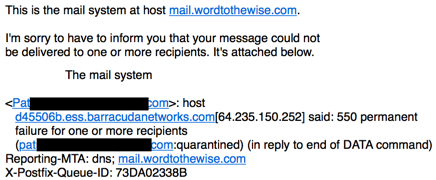
There’s useful information in the text portion of this email from my mail server. It says there was a permanent failure (550) and that my message won’t be delivered. It also says the email is quarantined in reply to the end of DATA. That’s actually a critical piece of information. It means Barracuda saw the entire message before deciding to reject it. It’s likely a problem with the content of the email and so I need to look at links in the message.
This type of plain text explanation is great for a human to read and act on. But it’s not that simple for list handling software to identify the relevant information in the text message and act on future emails to that recipient. Different MTA vendors and ESPs have done a lot of work to try and correctly parse bounce messages to pull out relevant information.
ISPs have tried to help the situation by giving more descriptive rejection messages. They’re still using the SMTP required 3 digit numbers, but they include short, parseable codes in the text portion of the message. In many cases they also include URLs and links that open up webpages explaining the meaning of the code. They even post a list of the most common codes on their postmaster webpages.
All of these things make it somewhat easier to handle bounces automatically. Kinda.
I’ve been working on some bounce handling recommendations for a client using a few different ESPs. I spent a good few days digging into the bounces returned by their different ESPs. It was an interesting exercise as it demonstrated how very differently ESPs handle bounces. But it also clarified for me that there are a lot of different kinds of bounces.
Fraudulent signups or spam?
- laura
- Mar 31, 2017
This morning I got spam from a major data broker / ESP / credit reporting agency claiming I’d signed up on some college website. In the UK. To check my credit score.
Uh. No. No I didn’t.
Of course, it’s very possible someone did use my email address when signing up for something at a UK university. They probably got a t-shirt or free pizza out of it. But that doesn’t really matter to me. A certain credit agency is spamming me with irrelevant and horribly targeted advertisements for their services and claiming the mail is opt in.
I know that address is widely sold in the UK to “legitimate” marketers. It’s very possible that it was purchased by the spammer in question. Or, I dunno, maybe they’re the ones selling it. As a victim, I don’t really care why a company is spamming me.
Part of a sender’s job to make sure their data is accurate. And they failed.
But for this particular company, that’s par for the course. When I posted about this over on Facebook, I had multiple friends pointing out that this company regularly spams and sells spamming services.
Spammers gonna spam.
AOL accidentally hard bounces valid mail
- laura
- Mar 30, 2017
Last night (Mar 29, 2017) between about 8pm Eastern and 9:30pm Eastern AOL suffered a technical issue. Every email sent to them received a “Recipient address rejected” reply. One example of the error message:
Mar 29 20:45:12 p2-lvmail11 lsb1-99-208-250/smtp[22251]: A88DFC2DBE9: to=<redacted@aol.com>, relay=mailin-01.mx.aol.com[64. 12.91.195]:25, delay=0.18, delays=0.01/0/0.14/0.03, dsn=5.1.1, status=bounced (host mailin-01.mx.aol.com[64.12.91. 195] said: 550 5.1.1 <redacted@aol.com>: Recipient address rejected: aol.com (in reply to RCPT TO command))
The issue was brought to AOLs attention and things were fixed rapidly after that. An AOL representative has stated that these were invalid replies and that addresses do not need to be removed from future emails.
Most of the ESPs are aware of this and are working to restore any bounced addresses to their users. At some places this requires manual intervention, so it’s taking some time to get all the addresses restored.
This is one of the reasons that our best bounce handling recommendations are not to remove an address for a single bounce – sometimes the ISPs have technical problems. Like the time a routing failure meant a major ISPs MX machines couldn’t reach their authentication servers to get the list of active users. Or the time all an ISPs MXs were removed from DNS. A lot of the internet is still managed manually, and despite extensive safeguards put in place bad things can, and do, still happen. Usually these problems are resolved quickly and mail starts flowing again.
Morning advice: Do not deactivate addresses that bounced at AOL last night.
Filters do what we tell them
- laura
- Mar 30, 2017
In the email space we talk about filters as if they were sentient beings. “The filters decided…” “The filters said…” This is convenient shorthand, but tends to mask that filters aren’t actually deciding or saying anything. Filters are software processes that follow rules dictated by the people who create and maintain them. The rules flow from the goals set by the mailbox provider. The mailbox provider sets goals based on what their users tell them. Users communicate what they want by how they interact with email.
What we end up with is a model where a set of people make decisions about what mail should be let in. They pass that decision on to the people who write the filters. The people who write the filters create software that evaluates email based on those goals using information collected from many places, including the endusers.
What mail should be let in is an interesting question, with answers that differ depending on the environment the filter is deployed in.
Consumer ISPs typically want to keep their users happy and safe. Their goals are to stop harmful mail like phishing, or mail containing viruses or malware. They also want to deliver mail that makes their users happy. As one ISP employee put it, “We want our users to be delighted with your mail.”
Businesses have a few other goals when it comes to filters. They, too, need filters to protect their network from malicious actors. As businesses are often directly targeted by bad actors, this is even more important. They also want to get business related email, whether that be from customers or vendors. They may want to ensure that certain records are kept and laws are followed.
Governments have another set of goals. Universities and schools have yet another set of goals. And, of course, there are folks who run their own systems for their own use.
Complicating the whole thing is that some groups have different tolerances for mistakes. For instance, many of our customers are folks dealing with being blocked by commercial filters. Therefore, we don’t run commercial filters. That does mean we see a lot of viruses and malware and rely on other strategies to stop a compromise, strategies that wouldn’t be as viable in a different environment.
Filters are built to meet specific user needs. What they do isn’t random, it’s not unknowable. They are designed to accomplished certain goals and generally they’re pretty good at what they do. Understanding the underlying goals of filters can help drive solutions to poor delivery.
Use the shorthand, talk about what filters are doing. But remember that there are people behind the filters. Those filters are constantly maintained in order to keep up with ever changing mail streams. They aren’t static and they aren’t forgotten. They are updated regularly. They are fluid, just like the mail they act on.
Categories
Tags
- 2010
- 2016
- 2fa
- 419
- 4xx
- 554
- 5xx
- @
- Aarp
- Abacus
- Abandoned
- Aboutmyemail
- Abuse
- Abuse Desk
- Abuse Enforcement
- Abuse Prevention
- Academia
- Accreditation
- Acme
- Acquisition
- Address Book
- Addresses
- Administrivia
- Adsp
- Advanced Delivery
- Advertiser
- Advertising
- Advice
- Affiliate
- Affiliates
- After the Email
- Alerts
- Algorithm
- Alice
- Alignment
- Allcaps
- Alt Text
- AMA
- Amazon
- Amp
- Amsterdam
- Analysis
- Anecdotes
- Anti-Spam
- Anti-Spam Laws
- Anti-Spammers
- Antwort
- AOL
- Appeals
- Appearances
- Appending
- Apple
- Arc
- Arf
- Arrest
- Arrests
- Ascii
- Asides
- Ask Laura
- Askwttw
- Assertion
- Assumptions
- ATT
- Attacks
- Attention
- Attrition
- Audit
- Authentication
- Authentication. BT
- Autonomous
- Award
- B2B
- B2C
- Backhoe
- Backscatter
- Backus-Naur Form
- Banks
- Barracuda
- Barry
- Base64
- Base85
- Bcc
- Bcp
- Bear
- Bears
- Behaviour
- Benchmark
- BESS
- Best Practices
- Bgp
- BIMI
- Bit Rot
- Bitly
- Bizanga
- Black Friday
- Blackfriday
- Blacklist
- Blacklists
- Blast
- Blo
- Block
- Blockin
- Blocking
- Blocklist
- Blocklisting
- Blocklists
- Blocks
- Blog
- Blog Links
- Blogroll
- Blogs
- Bob
- Boca
- Bofa
- Book Review
- Bot
- Botnet
- Botnets
- Bots
- Bounce
- Bounce Handling
- Bounces
- Branding
- Brands
- Breach
- Breaches
- Breech
- Bronto
- Browser
- Bsi
- Bucket
- Bulk
- Bulk Folder
- Bulk Mail
- Business
- Business Filters
- Buying Leads
- Buying Lists
- C-28
- CA
- Caa
- Cabbage
- Cache
- Cadence
- CAH
- California
- Campaign
- CAN SPAM
- Canada
- Candy
- Candycandycandy
- Canonicalization
- Canspam
- Captcha
- Career Developmnent
- Careers at WttW
- Cargo Cult
- Case Law
- Cases
- CASL
- Cat
- Cbl
- CDA
- Cert
- Certification
- CFL
- CFWS
- Change
- Charter
- Cheat
- Cheese
- Choicepoint
- Choochoo
- Christmas
- Chrome
- Cidr
- Cisco
- Civil
- Clear.net
- Clearwire.net
- Cli
- Click
- Click Through
- Click Tracking
- Clicks
- Clickthrough
- Client
- Cloudflare
- Cloudmark
- Cname
- Co-Reg
- Co-Registration
- Cocktail
- Code
- COI
- Comcast
- Comments
- Commercial
- Communication
- Community
- Comodo
- Comparison
- Competitor
- Complaint
- Complaint Rates
- Complaints
- Compliancce
- Compliance
- Compromise
- Conference
- Conferences
- Confirmation
- Confirmed (Double) Opt-In
- Confirmed Opt-In
- Congress
- Consent
- Conservatives
- Consistency
- Constant Contact
- Consultants
- Consulting
- Content
- Content Filters
- Contracts
- Cookie
- Cookie Monster
- COPL
- Corporate
- Cost
- Court Ruling
- Cox
- Cox.net
- Cpanel
- Crib
- Crime
- CRM
- Crowdsource
- Crtc
- Cryptography
- CSRIC
- CSS
- Curl
- Customer
- Cyber Monday
- Czar
- Data
- Data Hygiene
- Data Security
- Data Segmentation
- Data Verification
- DBL
- Dbp
- Ddos
- Dea
- Dead Addresses
- Dedicated
- Dedicated IPs
- Defamation
- Deferral
- Definitions
- Delays
- Delisting
- Deliverability
- Deliverability Experts
- Deliverability Improvement
- Deliverability Summit
- Deliverability Week
- Deliverability Week 2024
- Deliverabiltiy
- DeliverabiltyWeek
- Delivery Blog Carnival
- Delivery Discussion
- Delivery Emergency
- Delivery Experts
- Delivery Improvement
- Delivery Lore
- Delivery News
- Delivery Problems
- Dell
- Design
- Desks
- Dhs
- Diagnosis
- Diff
- Dig
- Direct Mag
- Direct Mail
- Directives
- Discounts
- Discovery
- Discussion Question
- Disposable
- Dk
- DKIM
- Dkimcore
- DMA
- DMARC
- DNS
- Dnsbl
- Dnssec
- Docs
- Doingitright
- Domain
- Domain Keys
- Domain Reputation
- DomainKeys
- Domains
- Domains by Proxy
- Dontpanic
- Dot Stuffing
- Dotcom
- Double Opt-In
- Dublin
- Dyn
- Dynamic Email
- E360
- Earthlink
- Ec2
- Ecoa
- Economics
- ECPA
- Edatasource
- Edns0
- Eec
- Efail
- Efax
- Eff
- Election
- Email Address
- Email Addresses
- Email Change of Address
- Email Client
- Email Design
- Email Formats
- Email Marketing
- Email Strategy
- Email Verification
- Emailappenders
- Emailgeeks
- Emails
- Emailstuff
- Emoji
- Emoticon
- Encert
- Encryption
- End User
- Endusers
- Enforcement
- Engagement
- Enhanced Status Code
- Ennui
- Entrust
- Eol
- EOP
- Epsilon
- Esp
- ESPC
- ESPs
- EU
- Ev Ssl
- Evaluating
- Events
- EWL
- Exchange
- Excite
- Expectations
- Experience
- Expires
- Expiring
- False Positives
- FAQ
- Fathers Day
- Fbl
- FBL Microsoft
- FBLs
- Fbox
- FCC
- Fcrdns
- Featured
- Fedex
- Feds
- Feedback
- Feedback Loop
- Feedback Loops
- Fiction
- Filter
- Filter Evasion
- Filtering
- Filterings
- Filters
- Fingerprinting
- Firefox3
- First Amendment
- FISA
- Flag Day
- Forensics
- Format
- Formatting
- Forms
- Forwarding
- Fraud
- Freddy
- Frequency
- Friday
- Friday Spam
- Friendly From
- From
- From Address
- FTC
- Fussp
- Gabbard
- GDPR
- Geoip
- Gevalia
- Gfi
- Git
- Giveaway
- Giving Up
- Global Delivery
- Glossary
- Glyph
- Gmail
- Gmails
- Go
- Godaddy
- Godzilla
- Good Email Practices
- Good Emails in the Wild
- Goodmail
- Google Buzz
- Google Postmaster Tools
- Graphic
- GreenArrow
- Greylisting
- Greymail
- Groupon
- GT&U
- Guarantee
- Guest Post
- Guide
- Habeas
- Hack
- Hacking
- Hacks
- Hall of Shame
- Harassment
- Hard Bounce
- Harvesting
- Harvey
- Hash
- Hashbusters
- Headers
- Heartbleed
- Hearts
- HELO
- Help
- Henet
- Highspeedinternet
- Hijack
- History
- Holiday
- Holidays
- Holomaxx
- Hostdns4u
- Hostile
- Hostname
- Hotmail
- How To
- Howto
- Hrc
- Hsts
- HTML
- HTML Email
- Http
- Huey
- Humanity
- Humor
- Humour
- Hygiene
- Hypertouch
- I18n
- ICANN
- Icloud
- IContact
- Identity
- Idiots
- Idn
- Ietf
- Image Blocking
- Images
- Imap
- Inbox
- Inbox Delivery
- Inboxing
- Index
- India
- Indiegogo
- Industry
- Infection
- Infographic
- Information
- Inky
- Inline
- Innovation
- Insight2015
- Integration
- Internationalization
- Internet
- Intuit
- IP
- IP Address
- Ip Addresses
- IP Repuation
- IP Reputation
- IPhone
- IPO
- IPv4
- IPv6
- Ironport
- Ironport Cisco
- ISIPP
- ISP
- ISPs
- J.D. Falk Award
- Jail
- Jaynes
- JD
- Jobs
- Json
- Junk
- Juno/Netzero/UOL
- Key Rotation
- Keybase
- Keynote
- Kickstarter
- Kraft
- Laposte
- Lavabit
- Law
- Laws
- Lawsuit
- Lawsuits
- Lawyer
- Layout
- Lead Gen
- Leak
- Leaking
- Leaks
- Legal
- Legality
- Legitimate Email Marketer
- Letsencrypt
- Letstalk
- Linked In
- Links
- List Hygiene
- List Management
- List Purchases
- List the World
- List Usage
- List-Unsubscribe
- Listing
- Listmus
- Lists
- Litmus
- Live
- Livingsocial
- London
- Lookup
- Lorem Ipsum
- Lycos
- Lyris
- M3AAWG
- Maawg
- MAAWG2007
- Maawg2008
- MAAWG2012
- MAAWGSF
- Machine Learning
- Magill
- Magilla
- Mail Chimp
- Mail Client
- MAIL FROM
- Mail Privacy Protection
- Mail Problems
- Mail.app
- Mail.ru
- Mailboxes
- Mailchimp
- Mailgun
- Mailing Lists
- Mailman
- Mailop
- Mainsleaze
- Maitai
- Malicious
- Malicious Mail
- Malware
- Mandrill
- Maps
- Marketer
- Marketers
- Marketing
- Marketo
- Markters
- Maths
- Mcafee
- Mccain
- Me@privacy.net
- Measurements
- Media
- Meh
- Meltdown
- Meme
- Mentor
- Merry
- Message-ID
- Messagelabs
- MessageSystems
- Meta
- Metric
- Metrics
- Micdrop
- Microsoft
- Milter
- Mime
- Minimal
- Minshare
- Minute
- Mit
- Mitm
- Mobile
- Models
- Monitoring
- Monkey
- Monthly Review
- Mpp
- MSN/Hotmail
- MSN/Hotmail
- MTA
- Mua
- Mutt
- Mx
- Myths
- Myvzw
- Needs Work
- Netcat
- Netsol
- Netsuite
- Network
- Networking
- New Year
- News
- News Articles
- Nhi
- NJABL
- Now Hiring
- NTP
- Nxdomain
- Oath
- Obituary
- Office 365
- Office365
- One-Click
- Only Influencers
- Oops
- Opaque Cookie
- Open
- Open Detection
- Open Rate
- Open Rates
- Open Relay
- Open Tracking
- Opendkim
- Opens
- Openssl
- Opt-In
- Opt-Out
- Optonline
- Oracle
- Outage
- Outages
- Outblaze
- Outlook
- Outlook.com
- Outrage
- Outreach
- Outsource
- Ownership
- Owning the Channel
- P=reject
- Pacer
- Pander
- Panel
- Password
- Patent
- Paypal
- PBL
- Penkava
- Permission
- Personalities
- Personalization
- Personalized
- Pgp
- Phi
- Philosophy
- Phish
- Phishers
- Phishing
- Phising
- Photos
- Pii
- PIPA
- PivotalVeracity
- Pix
- Pluscachange
- Podcast
- Policies
- Policy
- Political Mail
- Political Spam
- Politics
- Porn
- Port25 Blocking
- Postfix
- Postmaster
- Power MTA
- Practices
- Predictions
- Preferences
- Prefetch
- Preview
- Primers
- Privacy
- Privacy Policy
- Privacy Protection
- Private Relay
- Productive Mail
- Promotions
- Promotions Tab
- Proofpoint
- Prospect
- Prospecting
- Protocols
- Proxy
- Psa
- PTR
- Public Suffix List
- Purchased
- Purchased Lists
- Purchases
- Purchasing Lists
- Questions
- Quoted Printable
- Rakuten
- Ralsky
- Rant
- Rate Limiting
- Ray Tomlinson
- Rc4
- RDNS
- Re-Engagement
- Read
- Ready to Post
- Readytopost
- Real People
- Realtime Address Verification
- Recaptcha
- Received
- Receivers
- Recipient
- Recipients
- Redirect
- Redsnapper
- Reference
- Registrar
- Registration
- Rejection
- Rejections
- Rejective
- Relationship
- Relevance
- Relevancy
- Removals
- Render Rate
- Rendering
- Replay
- Repost
- Repudiation
- Reputation
- Requirements
- Research
- Resources
- Responsive
- Responsive Design
- Responsys
- Retail
- Retired Domains
- Retro
- Return Path
- Return Path Certified
- ReturnPath
- Reunion.com
- Reverse Dns
- RFC
- RFC2047
- RFC2821/2822
- RFC5321/5322
- RFC5322
- RFC8058
- RFC821/822
- RFCs
- Roadr
- RoadRunner
- Rodney Joffe
- ROKSO
- Role Accounts
- Rollout
- RPost
- RPZ
- Rule 34
- Rules
- Rum
- Rustock
- S.1618
- SaaS
- Sales
- Salesforce
- Sass
- SBCGlobal
- Sbl
- Scam
- Scammers
- Scams
- Scanning
- Scraping
- Screamer
- Screening
- Script
- Sec
- Secure
- Security
- Segmentation
- Selligent
- Send
- Sender
- Sender Score
- Sender Score Certified
- Senderbase
- Senderid
- Senders
- Senderscore
- Sendgrid
- Sending
- Sendy
- Seo
- Service
- Services
- Ses
- Seth Godin
- SFDC
- SFMAAWG2009
- SFMAAWG2010
- SFMAAWG2014
- Shared
- Shell
- Shouting
- Shovel
- Signing
- Signups
- Silly
- Single Opt-In
- Slack
- Slicing
- Smarthost
- Smiley
- Smime
- SMS
- SMTP
- Snds
- Snowshoe
- Soa
- Socia
- Social Media
- Social Networking
- Soft Bounce
- Software
- Sony
- SOPA
- Sorbs
- Spam
- Spam Blocking
- Spam Definition
- Spam Filtering
- Spam Filters
- Spam Folder
- Spam Law
- Spam Laws
- Spam Reports
- Spam Traps
- Spam. IMessage
- Spamarrest
- Spamassassin
- Spamblocking
- Spamcannibal
- Spamcon
- Spamcop
- Spamfiltering
- Spamfilters
- Spamfolder
- Spamhaus
- Spamhause
- Spammer
- Spammers
- Spammest
- Spamming
- Spamneverstops
- Spamresource
- Spamtrap
- Spamtraps
- Spamza
- Sparkpost
- Speaking
- Special Offers
- Spectre
- SPF
- Spoofing
- SproutDNS
- Ssl
- Standards
- Stanford
- Starttls
- Startup
- State Spam Laws
- Statistics
- Storm
- Strategy
- Stripo
- Stunt
- Subject
- Subject Lines
- Subscribe
- Subscriber
- Subscribers
- Subscription
- Subscription Process
- Success Stories
- Suing
- Suppression
- Surbl
- Sureclick
- Suretymail
- Survey
- Swaks
- Syle
- Symantec
- Tabbed Inbox
- Tabs
- Tagged
- Tagging
- Target
- Targeting
- Techincal
- Technical
- Telnet
- Template
- Tempo
- Temporary
- Temporary Failures
- Terminology
- Testing
- Text
- Thanks
- This Is Spam
- Throttling
- Time
- Timely
- TINS
- TLD
- Tlp
- TLS
- TMIE
- Tmobile
- Too Much Mail
- Tool
- Tools
- Toomuchemail
- Tor
- Trademark
- Traffic Light Protocol
- Tragedy of the Commons
- Transactional
- Transition
- Transparency
- Traps
- Travel
- Trend/MAPS
- Trend Micro
- Trend/MAPS
- Trigger
- Triggered
- Troubleshooting
- Trustedsource
- TWSD
- Txt
- Types of Email
- Typo
- Uce
- UCEprotect
- Unblocking
- Uncategorized
- Undisclosed Recipients
- Unexpected Email
- Unicode
- Unroll.me
- Unsolicited
- Unsubcribe
- Unsubscribe
- Unsubscribed
- Unsubscribes
- Unsubscribing
- Unsubscription
- Unwanted
- URIBL
- Url
- Url Shorteners
- Usenet
- User Education
- Utf8
- Valentine's Day
- Validation
- Validity
- Value
- Valueclick
- Verification
- Verizon
- Verizon Media
- VERP
- Verticalresponse
- Vetting
- Via
- Video
- Violence
- Virginia
- Virtumundo
- Virus
- Viruses
- Vmc
- Vocabulary
- Vodafone
- Volume
- Vzbv
- Wanted Mail
- Warmup
- Weasel
- Webinar
- Webmail
- Weekend Effect
- Welcome Emails
- White Space
- Whitelisting
- Whois
- Wiki
- Wildcard
- Wireless
- Wiretapping
- Wisewednesday
- Women of Email
- Woof
- Woot
- Wow
- Wtf
- Wttw in the Wild
- Xbl
- Xfinity
- Xkcd
- Yahoo
- Yahoogle
- Yogurt
- Zoidberg
- Zombie
- Zombies
- Zoominfo
- Zurb