DKIM2 and DNS and TCP
Post Quantum Cryptography
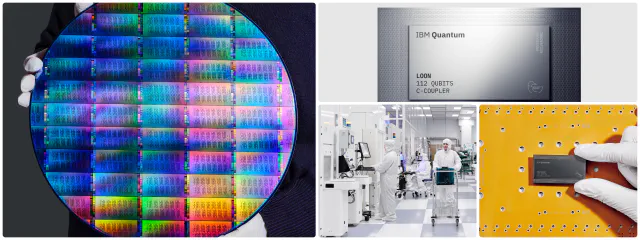
The shiny round thing above is a 300mm silicon wafer containing IBMs new Nighthawk R3 quantum CPU. It’ll be available next year, and will provide quantum systems capable of handling more than 1,000 qubits. Which is quite a lot. That these exist as a chip you can buy, rather than an exotic gadget plumbed out of stainless steel is a sign that quantum computers are a real thing.
One thing quantum processors may end up being better for than normal processors is breaking cryptography. Current recommendations are to migrate from our existing encryption algorithms (e.g. RSA or ed25519) to new algorithms that are more resistant to quantum attacks, and to do so by 2030 at the latest.
That includes DKIM2. The current draft spec requires supporting ML-DSA44, a modern module lattice based signature algorithm, as well as rsa and ed25519.
From a development and operations perspective not much changes to support mldsa44. Your DKIM2 signer calls “sign_with_mldsa44()” instead of “sign_with_rsa()”. You can use much the same tools to generate mldsa44 key pairs.
There is one significant change, though. mldsa44 signatures and keys are a lot bigger.
| Cypher | Public key size in DNS |
|---|---|
| 2048 bit RSA | 460 bytes |
| ed25519 | 147 bytes |
| mldsa44 | 1861 bytes |
Why do we care about key size? Because those keys are larger than we’re used to putting in DNS.
DNS size limits
When we ask the DNS a question the question and answer are each sent in a single UDP packet. The maximum size of that packet has varied over the years, but after the DNS flag day in 2020 everyone should be limiting them to 1220 bytes.
That 1861 byte mldsa44 public key won’t fit in a DNS UDP packet.
(I’m handwaving a bit about the details of packet size vs payload size, but it’s not even close to fitting.)
So what happens then?
The request for the public key goes out over UDP, and the response comes back with the “TC” bit set, meaning “this answer was truncated, you’ll need to try another way”. The other way is via TCP, which is a slightly slower protocol with a bit more overhead, and it puts a bit more load on the DNS server - but it works just fine.
DNS servers have been required to support TCP queries for over a decade. But as the vast majority of DNS replies fit into a UDP packet DNS will keep working pretty well even if TCP support is broken.
While the DNS server itself probably supports queries over TCP, all the packet filters and firewalls also need to allow those queries through. And there are tutorials and example configurations out there which say “allow UDP on port 53 for DNS”.
So if there’s old, or wrong, configuration on the authoritative DNS server, or associated firewalls and filters it’s possible that your DNS is broken over TCP and you’ve never noticed.
How do I check?
If you want to check if your authoritative DNS servers are well-behaved, the first thing to do is to find out where they are.
From a linux / macOS / wsl shell:
❯ dig wordtothewise.com ns

; <<>> DiG 9.10.6 <<>> wordtothewise.com ns
;; global options: +cmd
;; Got answer:
;; ->>HEADER<<- opcode: QUERY, status: NOERROR, id: 54952
;; flags: qr rd ra; QUERY: 1, ANSWER: 2, AUTHORITY: 0, ADDITIONAL: 5

;; OPT PSEUDOSECTION:
; EDNS: version: 0, flags:; udp: 1232
;; QUESTION SECTION:
;wordtothewise.com.		IN	NS

;; ANSWER SECTION:
wordtothewise.com.	3107	IN	NS	b.wordtothewise.com.
wordtothewise.com.	3107	IN	NS	a.wordtothewise.com.

;; ADDITIONAL SECTION:
b.wordtothewise.com.	3107	IN	A	45.58.56.29
a.wordtothewise.com.	3124	IN	AAAA	2a01:4f9:c013:306e::1
b.wordtothewise.com.	3107	IN	AAAA	2602:ffc5:70::1:25f3
a.wordtothewise.com.	3124	IN	A	46.62.235.105
We ask for the nameserver for the domain wordtothewise.com, and the response we get gives us two nameservers - a.wordtothewise.com and b.wordtothewise.com - and for each nameserver an IPv4 address and an IPv6 address.
Then we need to ask those nameservers for a record over TCP. It doesn’t matter what that record is, so we’ll ask for a record we know exists, the SOA record for the domain.
❯ dig +short +tcp wordtothewise.com soa @45.58.56.29
a.wordtothewise.com. hostmaster.wordtothewise.com. 2015102970 14400 3600 2592000 900
The +tcp tells dig to use TCP. We get an answer, so we know
that server can answer DNS over TCP. If we wanted to be very
sure, we’d test from somewhere outside our corporate network,
and we’d check all the IPv4 addresses and the IPv6 ones (as
firewalls and packet filters are usually configured separately
for IPv4 and v6).
Checking whether your DNS resolvers can handle large responses is simpler, just query DNS for something with a large answer.
❯ dig mldsa._domainkey.dkim2test.turscar.ie txt
;; Truncated, retrying in TCP mode.

; <<>> DiG 9.10.6 <<>> mldsa._domainkey.dkim2test.turscar.ie txt
;; global options: +cmd
;; Got answer:
;; ->>HEADER<<- opcode: QUERY, status: NOERROR, id: 58058
;; flags: qr rd ra; QUERY: 1, ANSWER: 1, AUTHORITY: 0, ADDITIONAL: 1

;; OPT PSEUDOSECTION:
; EDNS: version: 0, flags:; udp: 1232
;; QUESTION SECTION:
;mldsa._domainkey.dkim2test.turscar.ie. IN TXT

;; ANSWER SECTION:
mldsa._domainkey.dkim2test.turscar.ie. 2800 IN TXT
   "v=DKIM1; k=mldsa44; p=aPqINeKu3TVVai7cBYSPA7C6emk3kI/nvEL7hP
   VLb0WpiVM9xxbgXP4oDTtroFHp0LmQANXmHM3Asra8QByOxQoySF+Pp2WjdHa
   I37XCODJr5SvgkSdOgDpTvl7ft8oyNUVxoIVo9A7n8Y9PuJXJOnTZkuXL8kyM
   3mMxrbdHgzkiIvd45N" "ZoAZXts5LD+gkLr6B4XlQGlCn3zHiTqFtP2kpIvT
   dV1JyMVI6+sRgVwfQSiBMyRYupCQ+3QDUrgjHofFkZIQL3PyVi61Xbr3o4AyU
   E0E6MSOAh7v16+vI236JmciFYe8ShFd7QZ4RgnGRL9cmBxfYFUIIlg97fT6GZ
   A5lEszoyAiEOWAxDK9oh912ZwT9ZQm8QF/Y0Cr" "GCDbs0flrasz8G4N3a5/
   0ZuUC+m6A3+/43/nlwWQK3F8o9+l4n0frzjHi1XkOE4SkIGsQKDytZfne9JCI
   s2bfNWOobIQyGx5Q80h0qLl/kR7yRnAKjIjEpUjTRoLs+8k5w7P1Ud09JrxHm
   BgSRVWU24EyELqjauK71BwdOtT4oqihLlMximPONsU2WcJ7DTfdFiRL6Hl" "
   FRC6fdPwnrwfxs7iZmhFbIrGd12ZrDDcvdfpC4KVz5HukgC0b4GTYzj341m7m
   GMbVz+qJdCmB/jFYPAVP2GmzSiPTabMaQc0c4kHAuP5leuSqmpKqkyGd3scao
   hJPZ7piJ9ZlY69VbcDS/5HGZhl29Yj5RQSOEwDVTLGbpORrZiDALloPvMemOZ
   wMFZopso7Wloe72eZ" "2LTYAaxvxKcQBaVsvy0CfYaunR020azqpPhqNd1Ib
   pyRv3zixoqdo4C14Owi0BhpAFKoHu27M/3SD3r6yJIPQevbR6CJXqFxd2dD4g
   OdMpxKUFqiOJk5YfRkMFxSE3uDmUAyK6rPJjjuT7FX+agDA040P+bAOzUCu7L
   o2ticltiOJ3CRZn1myPwFlcjgoyOt7pvOP3oy" "rTNsR2GsNpC2I6wLS8qPr
   ZCAokKD25Ff00ux2KHRjJY3FQdCRjBKwn+ACqHfFQAekj64Xa8A6MnEHRNi4m
   bYFlODCSWSbxN41kyZQIZ1YHNlGBKzam96hIteyHarrUyXex80Ef+Y87AaEhD
   9x4USIk6Qfumo7LZDVcvTaSVu1JMNzQhh8xdinD25TdEio8f/raJkyTxx" "Q
   fs4f/kjsiXCcBuqaSNtDDyIs8lPj9OxV8Gal7dW3U4U6d4RuhiDgh9WzGfMTp
   EnbuaAKMgnx7DwVdREkSeb51wz7NxxTDk16Xb0Q6toOqOiOn61IlKS5a1goqn
   vahOg87dc76GNpmYm1Jqcqlzih5q60NpD59SPA2dufLbqkTF7GWrpEm1d+9nZ
   oJRUvQbKdZZCtLcF" "bngtx5DkEuvFsyKFnh9Ud03l6OlVG948dLl3JXArKv
   +K01knUZb6tjAPvv+xsmdnMFhc8J8wj/st2XcBa8i63DoZoYfll5K37bx3qyO
   YjiVBfXBG5qZdcZJM9EUO19tE6aWX3s14eepfwXKh0TGAYe+EJI9SDxHcJ6C4
   uwmwrlib+20OaI2kKf3C7SIp5Ct+Q92oOH/G" "f7fbCw+vEfVZvv99QgSxu+
   jlvTOHRlNvSbx9PYM+2NKyoPL5MJeMLLKL7t3skcVnw9Q4fEdy8kxfhd/l6Lz
   8eYyUhNU3QOeMY8KUSMqlQRtYacmwtpMhQW61a1eR8RltNvrmcP4eoLW/vGSC
   vrXIASlclEUjbZmP1Iqk3KRUWV5Q=="

;; Query time: 10 msec
;; SERVER: 100.100.100.100#53(100.100.100.100)
;; WHEN: Fri Nov 13 16:49:24 GMT 2026
;; MSG SIZE  rcvd: 1861
That you got an answer shows that you can resolve large DNS results, and it shows you what an ML-DSA44 DKIM2 public key looks like.