Identifying domains that don’t accept or send email

A couple folks have asked me recently about MX records that they don’t understand. These records consist of a single . or they contain localhost or they are 127.0.0.1.

In all cases, the domain owners use these records to signal that the domains don’t accept email. What do these records look like?
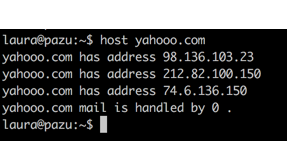
screenshot of a terminal session that says: 
laura@pazu:~$ host yahooo.com
yahooo.com has address 98.136.103.23
yahooo.com has address 212.82.100.150
yahooo.com has address 74.6.136.150
yahooo.com mail is handled by 0 .

Why do domains do this? In all cases it’s because the domain owners want to signal they don’t accept email. But there are a number of different reasons to do this.

In the yahooo.com example, this is a domain actually owned by Yahoo. The website redirects to the primary yahoo.com site. But, it’s not a domain that accepts mail. They notify us of this by using a dot mx.
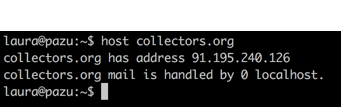
Screenshot of a terminal session that says: 
laura@pazu:~$ host collectors.org
collectors.org has address 91.195.240.126
collectors.org mail is handled by 0 localhost.

In the collectors.org example, they list the MX as localhost. This is a convention I’ve seen from a lot of for-sale domains. (As an aside, some of the for sale domains do accept email. The ones I’ve identified use a handful of common MXs that I suspect belong to the companies that sell access to spamtraps.)

I’ve also seen some domains use 127.0.0.1 as a MX record. Again, this is signalling that they really, really don’t want to accept email.

There’s also a way to signal a domain doesn’t send mail. This is accomplished by using a SPF -all record.
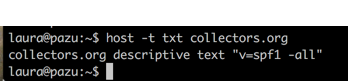
Screenshot of a terminal session that says:
laura@pazu:~$ host -t txt collectors.org
collectors.org descriptive text "v=spf1 -all"

There you go. Multiple ways to signal a domain doesn’t accept email and one way to signal the domain never sends email.


Related Posts

Bounces, complaints and metrics

In the email delivery space there are a lot of numbers we talk about including bounce rates, complaint rates, acceptance rates and inbox delivery rates. These are all good numbers to tell us about a particular campaign or mailing list. Usually these metrics all track together. Low bounce rates and low complaint rates correlate with high delivery rates and high inbox placement.

Read More

Six best practices for every mailer

People get into all sorts of details when talking about best practices. But so much of email depends on the type of email and the target market and the goals of the sender. It’s difficult to come up with universal best practices.
I’ve said in the past that I think that best practices are primarily technical. I don’t believe there is a best frequency or a best time to send mail or a best image to text ratio.
My top 6 best practices every marketer should be doing (and too few are).

Read More

Metric Monetization

As a digital channel, email provides a lot of different metrics for marketers to use. Not only can marketers measure things like open and click rates, but they can tie these numbers back to a particular recipient. This treasure trove of information leads to obsessing over making the numbers look good. For good deliverability senders want low bounce rates, low spamtrap rates, and high engagement rates.
These metrics are important because they’re some of the things that filters look at when making delivery decisions. We care about this data because the receiver ISPs care about the data. The ISPs care about this data because they are characteristics of wanted and/or opt in email.

Over the past few years a number of companies sell services selling good metrics.

Read More