Another way Gmail is different

I was answering a question on Mailop earlier today and had one of those moments of clarity. I finally managed to articulate one of the things I’ve known about Gmail, but never been able to explain. See, Gmail has never really put a lot of their filtering on the SMTP transaction and IP reputation. Other ISPs do a lot of the heavy lifting with IP filters. But not Gmail.
While I was writing the answer I realized something. Gmail was a late entrant into the email space. AOL, Hotmail, Yahoo, even the cable companies, were providing email services in the 90s. When spam started to be a problem, they started with IP based blocking. As technology got better and content filtering became viable, improvements were layered on top of IP based blocking.
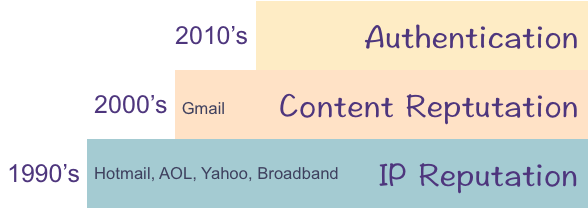
Gmail didn’t enter the mailbox market until the 2000’s. When they did, they had money, lots of hardware, and internal expertise to do content filtering. They didn’t start with IP based filtering, so their base is actually content filtering. Sure, there were some times when they’d push some mail away from the MTAs, but most of their filtering was done after the SMTP transaction. The short version of this is I never really pay any attention to IP reputation when dealing with Gmail. It’s just another factor. Unless you’re blocked and if you get blocked by Gmail, wow, you really screwed up.
Gmail does, of course, do some IP based blocking. But in my experience IP filters are really only turned against really egregious spam, phishing and malicious mail. Most email marketers reading my blog won’t ever see IP filters at Gmail because their mail is not that bad.
Other companies aren’t going to throw away filters that are working, so the base of their filters are IPs. But Google never had that base to work from. Their base is content filters, with some IP rep layered on top of that.
That’s a big reason Gmail filters are different from other filters.

Related Posts

From the archives: Taking Permission

From February 2010, Taking Permission.

Permission is always a hot topic in email marketing. Permission is key! the experts tell us. Get permission to send email! the ISPs tell us.
Marketers have responded by setting up processes to “get” permission from recipients before adding them to mailing lists. They point to their privacy polices and signup forms and say “Look! the recipient gave us permission.”
In many cases, though, the permission isn’t given to the sender, permission is taken from the recipient.
Yes, permission is being TAKEN by the sender. At the point of address collection many senders set the default to be the recipient gets mail. These processes take any notion of giving permission out of the equation. The recipient doesn’t have to give permission, permission is assumed.
This isn’t real permission. No process that requires the user to take action to stop themselves from being opted in is real permission. A default state of yes takes the actual opt-in step away from the recipient.
Permission just isn’t about saying “well, we told the user if they gave us an email address we’d send them mail and they gave us an email address anyway.” Permission is about giving the recipients a choice in what they want to receive. All too often senders take permission from recipients instead of asking for permission to be given.
Since that post was originally written, some things have changed.
CASL has come into effect. CASL prevents marketers from taking permission as egregiously as what prompted this post. Under CASL, pre-checked opt-in boxes do not count as explicit permission. The law does have a category of implicit permission, which consists of an active consumer / vendor relationship. This implicit permission is limited in scope and senders have to stop mailing 2 years after the last activity.
The other change is in Gmail filters. Whatever they’re doing these days seems to really pick out mail that doesn’t have great permission. Business models that would work a few years ago are now struggling to get to the inbox at Gmail. Many of these are non-relationship emails – one off confirmations, tickets, receipts. There isn’t much of a relationship between the sender and the recipient, so the filters are biased against the mail.
Permission is still key, but these days I’m not sure even informed permission is enough.

Read More

Delivery challenges increasing

Return Path published their most recent Global Deliverability report this morning. (Get the Report) This shows that inbox placement of mail has decreased 6% in the second half of 2011. This decrease is the largest decrease Return Path has seen in their years of doing this report.
To be honest, I’m not surprised at the decrease. Filters are getting more sophisticated. This means they’re not relying on simply IP reputation for inbox delivery any longer. IP reputation gets mail through the SMTP transaction, but after that mail is subject to content filters. Those content filters are getting a lot better at sorting out “wanted” from “unwanted” mail.
I’m also hearing a lot of anecdotal reports that bulk folder placements at a couple large ISPs increased in the first quarter of 2012. This is after the RP study was finished, and tells me increased bulk folder placement is more likely to be a trend and not a blip.
One of the other interesting things from the RP study is that the differences are not across all mail streams, but are concentrated in certain streams and they vary across different regions.

Read More

ISPs speak at M3AAWG

Last week at M3AAWG representatives from AOL, Yahoo, Gmail and Outlook spoke about their anti-spam technologies and what the organizations were looking for in email.
This session was question and answers, with the moderator asking the majority of the questions. These answers are paraphrased from my notes or the MAAWG twitter stream from the session.
What are your biggest frustrations?
AOL: When senders complain they can’t get mail in and we go look at their stats and complaints are high. Users just don’t love that mail. If complaints are high look at what you may have done differently, content does have an effect on complaints.
Outlook: When we tightened down filters 8 years ago we had to do it. Half of the mail in our users inbox was spam and we were losing a steady number of customers. The filter changes disrupted a lot of senders and caused a lot of pain. But these days only 0.5% of mail in the inbox is spam.  Things happen so fast, though, that the stress can frustrate the team.
Gmail: Good senders do email badly sometimes and their mail gets bulked. Senders have to get the basic email hygiene practices right. Love your users and they’ll love you back.
What’s your philosophy and approach towards mail?
AOL: There is a balance that needs to be struck between good and bad mail. The postmaster team reminds the blocking team that not all mail is bad or malicious. They are the sender advocates inside AOL. But the blocking team deals with so much bad mail, they sometimes forget that some mail is good.
Yahoo: User experience. The user always comes first. We strive to protect them from malicious mail and provide them with the emails they want to see. Everything else is secondary.
Gmail: The faster we stop spam the less spam that gets sent overall. We have highly adaptive filters that can react extremely quickly to spam. This frustrates the spammers and they will give up.
Outlook: The core customer is the mailbox user and they are a priority. We think we have most of the hardcore spam under control, and now we’re focused on personalizing the inbox for each user. Everyone online should hold partners accountable and they should expect to be held accountable in turn. This isn’t just a sender / ESP thing, ISPs block each other if there are spam problems.
What are some of your most outrageous requests?
We’ve been threatened with lawsuits because senders just don’t want to do the work to fix things. Some senders try to extort us. Other senders go to the advertising execs and get the execs to yell at the filtering team.
Coming to MAAWG and getting cornered to talk about a particular sender problem. Some senders have even offered money just to get mail to the spam folder.
Senders who escalate through the wrong channels. We spent all this money and time creating channels where you can contact us, and then senders don’t use them.
Confusing business interests with product interests. These are separate things and we can’t change the product to match your business interest.
What are your recommendations for changing behaviors?
Outlook: We provide lots of tools to let you see what your recipients are doing. USE THE TOOLS. Pay attention to your recipient interaction with mail. Re-opt-in recipients periodically. Think about that mail that is never opened. Monitor how people interact with your mail. When you have a problem, use our webpages and our forms. Standard delivery problems have a play book. We’re going to follow that playbook and if you try to get personal attention it’s going to slow things down. If there’s a process problem, we are reachable and can handle them personally. But use the postmaster page for most things.
Gmail: Get your hygiene right. If you get your hygiene right, deliverability just works. If you’re seeing blocking, that’s because users are marking your mail as spam. Pay attention to what the major receivers publish on their postmaster pages. Don’t just follow the letter of the law, follow the spirit as well. Our responsibility, as an ISP, is to detect spam and not spam. Good mailers make that harder on us because they do thinks that look like spammers. This doesn’t get spammer mail in more, it gets legitimate mail in less. Use a real opt-in system, don’t just rely on an implied opt-in because someone made a purchase or something.
Yahoo: ESPs are pretty good about screening their customers, so pay attention to what your ESPs are saying. Send mail people want. Verify that the email addresses given to you actually belong to people who want your mail. Have better sender practices.
What do you think about seed accounts?
The panel wasn’t very happy about the use of seed accounts. Seeds are not that useful any longer, as the ISPs move to more and more personalized delivery. Too much time and too many cycles are used debugging seed accounts. The dynamic delivery works all ways.
When things go wrong what should we do?
AOL: Open a ticket. We know we’ve been lax recently, but have worked out of our backlog and are caught up to date. Using the ticketing system also justifies us getting more headcount and makes everyone’s experience better. Also, don’t continue what you’re doing. Pausing sending while you’re troubleshooting the issue. We won’t adjust a rep for you, but we may be able to help you.
Gmail: Do not jump the gun and open a ticket on the first mail to the spam folder. Our filters are so dynamic, they update every few minutes in some cases. Be sure there is a problem. If you are sure you’re following the spirit and letter of the sender guidelines you can submit a ticket. We don’t respond to tickets, but we work every single one. When you’re opening a ticket provide complete information and full headers, and use the headers from your own email address not headers from a seed account. Give us a clear and concise description of the problem. Also, use the gmail product forum, it is monitored by employees and it’s our preferred way of getting information to the anti-abuse team. Common issues lots of senders are having will get addressed faster.
Outlook: Dig in and do your own troubleshooting, don’t rely on us to tell you what to fix. The support teams don’t have a lot of resources so use our public information. If you make our job harder, then it takes longer to get things done. But tell us what changes you’ve made. If you’ve fixed something, and tell us, our process is different than if you’re just asking for a delisting or asking for information. When you’ve fixed things we will respond faster.
How fast should users expect filters to respond after making changes?
Filters update continually so they should start seeing delivery changes almost immediately. What we find is people tell us they’ve made changes, but they haven’t made enough or made the right ones. If the filters don’t update, then you’ve not fixed the problem.

Read More