Use all the channels
One of the hardest deliverability situations to address is when all mail from a certain sender is going to the bulk folder. I’ve had numerous clients come to me to address this situation over the years. Ideally, clients come to me before all their mail is going to bulk. Then we can make some tweaks and changes to their mail program, repair the reputation and then recover other addresses. We have knobs we can twist to fix things if some people are still getting messages in their inbox. We have data to measure.
When all mail is going to bulk, though, we lose access to the knobs and the data. There are zero complaints if mail is going to bulk. There are no opens or clicks, because many ISPs disable images and links in the bulk folder. Our normal “fixing reputation” tools are taken away from us.
Senders with all their mail going to bulk are faced with a profound challenge. How can they engage customers who are unengaged and who are not seeing mail at all? How can we fix deliverability when our normal tools and metrics are unavailable?
If we can get even a small percentage of recipients to go pull mail out of bulk or spam and move it to their inbox, then we’re well on our way to repairing reputation. But how can we get them to go look for the mail in the bulk folder. Recent Litmus research suggests that a significant percentage of folks regularly check their spam folder, but this isn’t always enough to repair reputation,
The question becomes how can the senders encourage recipients to go digging through their spam folder.
This is the point where I start quizzing clients on what other channels they use to communicate with their customers. I’ll run through the whole list: social media, snail mail, push notices through apps, SMS, website popups, Facebook ads. I work with them to identify users who are engaged with their brand and brainstorm ways to get those users to look for mail.
I’m always pleased to see large brands using these strategies. Just recently Blizzard used twitter to communicate with their users about email problems. They tweeted.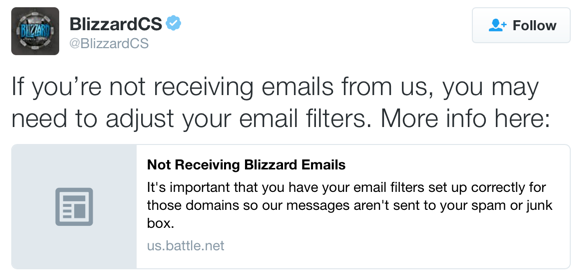
The link takes you to the Blizzard support site. Where they give specific instructions on how to whitelist mail and what mail to whitelist.
We regularly send emails from @blizzard.com, @email.blizzard.com, @em.blizzard.com, and @battle.net. It’s important that you have your email filters set up correctly for those domains so our messages aren’t sent to your spam or junk box.
For instructions to set up your filters, choose your email provider below. If your provider isn’t listed, check with them directly for assistance.
Using alternate channels to get people to engage with mail is a workable solution to delivery problems. Even big brands with engaged user bases have to do it occasionally. Don’t let embarrassment stop you from addressing this problem.