Mail Client Improvements
There’s been extensive and ongoing development of email through the years, but much of it has been behind the scenes. We were focused on the technology and safety and robustness of the channel. We’re not done yet, but things are much better than they were.
The good part of that is there is some space to make improvements to the inbox as well. Over the last few months there have been a number of announcements from different mail client providers about how they’re updating their mail client.
Unsubscribes handled by the email client
Apple announced they were adding a link to unsubscribe into the mail client for iOS 10. It works much like the links in the Gmail and Hotmail clients, by looking for the list unsubscribe header and then sending a message to that address. Al did a bunch of testing and has a full blog post on how the list unsub link works in iOS, so go check out his post.
The important bits are they’re only using the mailto: link, they are not following any URLs. For those of you who want to support this, you’ll need to provide an address for unsubscribes. One of the absolute easiest ways to do this is use an encoded left hand side of the address so each unsubscribe can be processed based on the email address. Think of it like a VERP string.
It’s worth noting that two large players, Apple and Google, in the email client space have focused on the mailto: link for unsubscribes. There are issues that come up with an email client mediated unsubscribes, but a number of them go away using a http:// level unsubscribe.
It’s also interesting that this innovation has created a discussion among some marketers about where the unsubscribe link should be in an email. Some people feel very strongly that the only right place to put an unsubscribe link is at the bottom of an email. That choice is being somewhat removed from their hands with these changes to the mail client.
Better CSS and HTML support
Last month Microsoft went to the Litmus design conference and announced they were going to be working with Litmus and email senders to improve mail display in Outlook. This week Gmail announced they were supporting more CSS to make responsive design easier.
Displaying security information to end users
Earlier this year, Gmail started showing their users if mail came in over an encrypted connection. Mail sent without using TLS received an open red padlock next to the sender’s name.
This week folks noticed Gmail had quietly rolled out another feature to communicate security status to end users. Now, if you click on “show original” Gmail doesn’t simply show you a raw text version of the file, they show you specific authentication information about that message.
I have a screen shot of what that information looks like.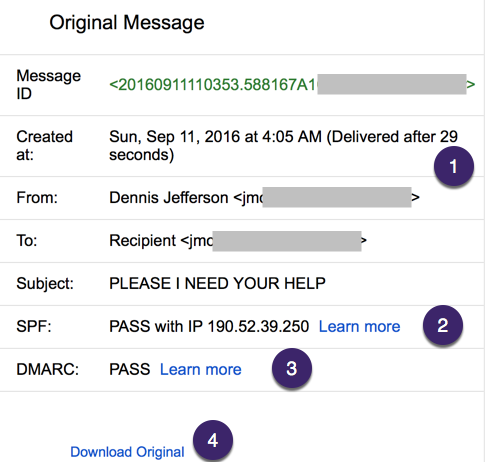
There are multiple features here that make it easier to see what’s going on with email.
- How long the delivery took! This is great, because there are so many places email can get caught up. This will tell senders wether the problem is on the sending side or the receiving side. Looking at the headers of this particular message, the time is looking at how long the message took to get from the Gmail MX to the user’s inbox (or, in this case, spam folder).
- SPF pass. The learn more link is a little disappointing, as it mostly talks about how you can implement SPF, not about what it means for recipients. It also says it helps recipients distinguish spam, except this particular message is a classic 419 spam. But it’s a good start.
- DMARC pass. Again, there isn’t much information about why a user should care about DMARC passing in the learn more link, but it is a good start.
Overall, these are exciting developments for recipients and senders. It’s really nice to see some work being done at making mail clients more descriptive. Because so much online security revolves around email, it’s a critical security step to show authentication results to end users. I expect some of these changes will be pushed out to the inbox over time, as Gmail wrestles with providing enough but not too much information.
All in all, these are more meaningful changes to email clients than I’ve seen in years.