Comodo, TLS certificates and business ethics

We run a lot of our own infrastructure at Word to the Wise. Our email and web presence runs on our own hardware, in our own cabinet in our own network space. Partly that’s because we’re all from very technical backgrounds, and can run them in a way that’s better suited to our needs than an off-the-shelf web service. Partly it’s so we can do things like add instrumentation to our inbound mail stream so we have easy access to information when diagnosing a customer’s delivery issues. But it’s also partly so we can keep up to date on protocols and software, and leaven our advice to clients with some first hand, real world experience.
One of those things is TLS certificates, for webservers and email servers.
We already used Comodo for code-signing certificates, so when their sales rep called me and offered some decent pricing of extended validation (EV or “green bar”) certificates in exchange for a three-year commitment that seemed like a good opportunity to experience the extended validation process.
I’ve written previously about how painful the process of getting a TLS certificate from a legacy certification authority such as Comodo is, but this post isn’t about that.
I mentioned a few months ago that our green bar TLS certificate would be going away. That was because Comodo didn’t honor their agreement with us. While we ordered three years of EV certificate from Comodo, paid them for three years of EV certificate and confirmed in writing with the sales rep that they would provide three years of EV certificate, after one year Comodo decided that they wouldn’t honor that agreement.
The sales rep was mysteriously “no longer with the company” and his sales manager decided that they’d keep the money, but not provide the agreed to certificates. After a dozen or so promised calls back or email replies from a “sales manager” to discuss “what they could do for us” didn’t happen, we gave up on Comodo and switched to using Lets Encrypt for our TLS certificates.
We’re very, very happy with Let’s Encrypt. The price of “free” is nice, but it’s the simplicity, reliability and general lack of having to deal with horrible sales reps that’s the best thing.
Apparently a lot of other Comodo customers thought the same thing, as Comodo seems to want to recapture those customers by pretending to be Let’s Encrypt.  They filed trademark registrations for “Let’s Encrypt”, “Comodo Let’s Encrypt” and “Let’s Encrypt with Comodo”. Comodo is in the business of “trust” and “identity” and I can’t think of any behaviour of theirs more antithetical to that.
And, on an email note, Comodo also seemed to decide that they didn’t want their employees to know about this, nor to answer questions about it, and reportedly configured their email filters to reject email mentioning letsencrypt.org with “mail contains a virus”.
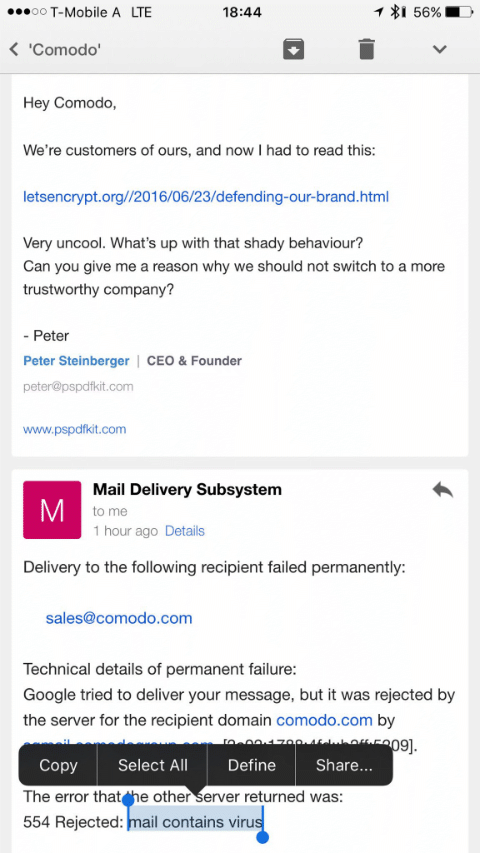
steipete_2016-Jun-23
— from Peter Stenberger, on twitter
(Given Comodo are a major email filter vendor I hope that that’s just a local configuration used by Comodo themselves, not part of their public filtering products.)
We will no longer be using or recommending Comodo as a vendor.
(This post brought to you as an exercise in avoiding the question “What effect will brexit have on the email industry?”, as the answer “Global economic collapse would probably be bad for the email industry, yes.” seems a little simplistic.)
Related Posts

Google drops obsolete crypto

Google is disabling support for email sent using version 3 of SSL or using the RC4 cypher.
They’re both very old – SSLv3 was obsoleted by TLS1.0 in 1999, and RC4 is nearly thirty years old and while it’s aged better than some cyphers there are multiple attacks against it and it’s been replaced with more recent cyphers almost everywhere.
Google has more to say about it on their security blog and if you’re developing software you should definitely pay attention to the requirements there: TLS1.2, SNI, TLS_ECDHE_RSA_WITH_AES_128_GCM_SHA256, DNS alternate names with wildcards.
For everyone else, make sure that you’ve applied any patches your vendor has available well before the cutoff date of June 16th.

Read More

TLS and Encryption

Yesterday I talked about STARTTLS deployment, and how it was a good thing to support to help protect the privacy of your recipients.
STARTTLS is just one aspect of protecting email from eavesdropping; encrypting traffic as the mail is being sent or read and encrypting the message itself using PGP or S/MIME are others. This table shows what approaches protect messages at different stages of the messages life:
[table nl=”~”] Compromise point,SUBMIT~+IMAPS,TLS,PGP /~SMIME
Sender’s computer as mail is sent,,,
Sender’s computer later,,,[icon name=check-square] Sender’s network,[icon name=check-square],,[icon name=check-square] Sender’s ISP,,,[icon name=check-square] Global Internet (passive),,[icon name=check-square],[icon name=check-square] Global Internet (active),,[icon name=question-circle],[icon name=check-square] Global Internet (later),,[icon name=question-circle],[icon name=check-square] 3rd party mail services,,,[icon name=check-square] Recipient’s ISP,,,[icon name=check-square] Recipient’s network,[icon name=check-square],,[icon name=check-square] Recipient’s computer as mail is read,,,
Recipient’s computer later,,,[icon name=check-square] [/table] You can see that if you’re sending really sensitive data, you should be encrypting the entire message with PGP or S/MIME (or not sending the message via email at all). Doing so will protect the content of the mail against pretty most sorts of attack, but is pretty intrusive for the sender and recipient so can’t really be used without prior agreement with the recipient.
The other approaches will make some sorts of passive surveillance much more difficult, though.
Encrypting the connection a user uses to send mail ([rfc 6409]using the SUBMIT protocol[/rfc]) and to read mail ([rfc 2595]using TLS to protect IMAP or POP3[/rfc]) will protect against passive sniffing when the user is on possibly hostile network, such as public wifi or an employers network. That’s an easy place to try and sniff traffic, and if that traffic isn’t protected an attacker can not only read someone’s email, they can steal their credentials and cause all sorts of havoc. All general purpose mail clients and all ISPs support encryption here, so it’s almost universally used.
STARTTLS use with SMTP is all about protecting email traffic when it’s being sent between ISPs – both between the sender’s ISP and the recipient’s and also between any 3rd party mail services (outsourced spam filtering, mailing list providers, vanity domain fowarders, etc.).
I’ve listed three different sorts of attack on that inter-ISP traffic – passive, active and “later”.
A passive attack is where the attacker has the ability to listen to bytes as they go by, but isn’t able to modify or intercept them. While you might think of this as something a nation state would do, via secret agreements with backbone providers or high-tech fiber optic cable taps, there are ways a smaller attacker might be able to compromise an intermediate router and tap that traffic with little risk of detection. Deploying any sort of STARTTLS will protect against this, even if it’s misconfigured, using expired certificates or even just the default setup of a newly deployed mailserver. Facebook describe these weaker forms of STARTTLS as “opportunistic” in their survey – it’s not perfect, but it’s a lot better than nothing.
An active attack is one where the attacker has the ability to intercept and modify traffic between the two ISPs. This seems like it would be harder to do than a passive attack, but it’s often easier, though not as stealthy. Once that’s done, the attacker can pretend to be the recipient ISP and have full access to read, modify or discard messages. To protect against this sort of attack TLS needs to be used not just to encrypt the traffic in-flight, but also to allow the sender to validate that the mailserver they’re talking to really is who they think it is. This is what Facebook describe as “strict” – it requires that the mailserver have a valid certificate, issued by a legitimate certification authority for the domain that the mail is being sent to.
What about “later”? It’s easy to imagine a case where an attacker has been passively monitoring and recording encrypted traffic for a while, and then later they manage to acquire the encryption keys that were used (by, for example, issuing a subpoena to the recipient ISP, or using a compromise to rip them out of your servers memory). With many forms of encryption once you have those private keys it’s possible to decrypt all the traffic you’ve already captured. There are a few algorithms, though, that have what’s known as perfect forward secrecy – knowing the private keys that were used at the time the mail was transferred doesn’t allow you to decrypt them at a later time. If you’re concerned about the privacy of your messages, you should definitely read up on how to set that up.
All of these techniques are a great way to defend against ubiquitous or casual attempts to read your messages, but none of them are proof against a determined attacker. If all else fails, there’s always a wrench attack.
security

Read More

Make Mail.app work for you

Mark Nottingham (@mnot) posted a good idea to twitter:
 

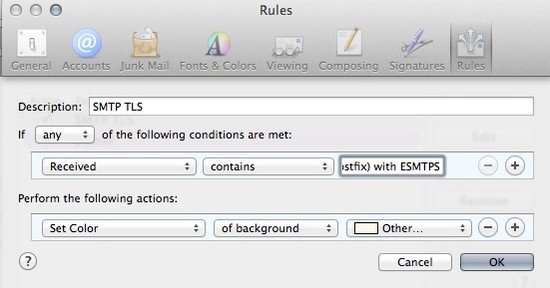
Highlight e-mails that your MTA receives with TLS. Make sure to include your mail server’s name in the value (here to the left of what’s shown)
mailapprules

Read More