Make Mail.app work for you

Mark Nottingham (@mnot) posted a good idea to twitter:
 

Highlight e-mails that your MTA receives with TLS. Make sure to include your mail server’s name in the value (here to the left of what’s shown)
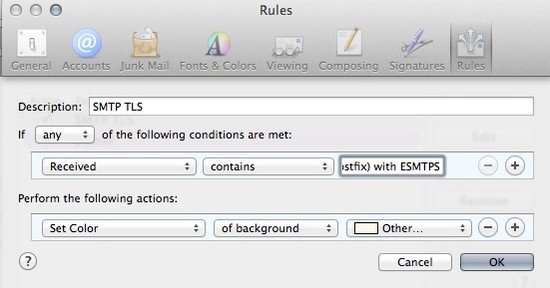
mailapprules


Mail.app has client support for mail routing rules. Out of the box all they’re configured to do is highlight mail from Apple, but Mark is adding a rule to passively keep an eye on how mail is being sent to you.
Mark is using it to see who is sending mail over opportunistic TLS – he’s looking for the “with ESMTPS” string that an MTA will add to a Received line when it receives mail sent over TLS. To check that your mailserver records it in the same way, find a recent email sent to you from gmail (who are encrypting everything) and look at the raw source of the mail with View [icon name=”long-arrow-right” class=””] Message [icon name=”long-arrow-right” class=””] Raw Source (or Alt-Command-U) and look for the Received line where your mailserver accepted the mail. The Received line you’re looking for will have “by your.mailserver.name” in it.
 
Mine looks like this:

  Received: from malur.postgresql.org (malur.postgresq
      by mx.wordtothewise.com (Postfix) with ESMTPS id
      for <steve@blighty.com>; Wed, 10 Sep 2014 21:56:

 
So I need to set up a rule that looks for a Received header that contains the string “by mx.wordtothewise.com (Postfix) with ESMTPS” and does something with it. You’ll need to do something slightly different, depending on how your mailserver generates Received headers.
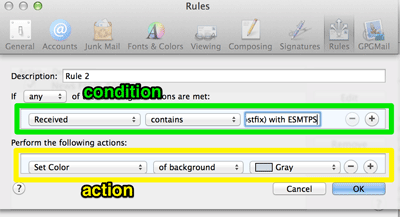
If you go to Mail [icon name=”long-arrow-right” class=””] Preferences… [icon name=”long-arrow-right” class=””] Rules [icon name=”long-arrow-right” class=””] Add Rule you’ll get to this dialog for adding a new rule:
 
rules.png
 
 
This has two main sections – the upper lets you set a a list of conditions to check incoming mail against, the lower lets you tell Mail.app what actions to take for mails that match.
This is a fairly simple rule with one condition (there’s a received header that contains this string) and one action (highlight this mail in the inbox).
Set the condition as it’s shown above “Received” “contains” “by your.mailserver.name (Postfix) with ESMTPS“. (If there isn’t an option for “Received” in the first combobox you need to select “Edit Header List…” in that combobox to add it first). Then set the action as it’s shown above, to highlight mails that match the condition.
Click OK, and you should be highlighting new mails that match the rule as they arrive. You’ll be able to see who is sending mail via TLS, and who isn’t.
 
There are lots of other things you could use the same approach to check for. Check the Authentication-Results header for “dkim=pass” (and maybe highlight different key lengths in different colours). Check X-Spam-Status to look for particular SpamAssassin rules firing. Use the contents of the List-ID header to route mail sent to mailing lists to it’s own mailbox reliably. Have Mail.app beep and bounce it’s icon when you receive mail from your boss or your customer, so you can respond promptly even when you’re slacking off on a Friday afternoon …


Related Posts

The rules of delivery success

Senders with delivery problems ask about “the rules.” “Just tell us what the rules are!” “If the ISPs would just tell us what to do we’d do it!” There is only one rule anyone needs to pay attention to for good mail delivery: Respect the recipient.
Not good enough for you? Want more specific rules? OK.
The two rules everyone must follow for good mail delivery.

Read More

TLS and Encryption

Yesterday I talked about STARTTLS deployment, and how it was a good thing to support to help protect the privacy of your recipients.
STARTTLS is just one aspect of protecting email from eavesdropping; encrypting traffic as the mail is being sent or read and encrypting the message itself using PGP or S/MIME are others. This table shows what approaches protect messages at different stages of the messages life:
[table nl=”~”] Compromise point,SUBMIT~+IMAPS,TLS,PGP /~SMIME
Sender’s computer as mail is sent,,,
Sender’s computer later,,,[icon name=check-square] Sender’s network,[icon name=check-square],,[icon name=check-square] Sender’s ISP,,,[icon name=check-square] Global Internet (passive),,[icon name=check-square],[icon name=check-square] Global Internet (active),,[icon name=question-circle],[icon name=check-square] Global Internet (later),,[icon name=question-circle],[icon name=check-square] 3rd party mail services,,,[icon name=check-square] Recipient’s ISP,,,[icon name=check-square] Recipient’s network,[icon name=check-square],,[icon name=check-square] Recipient’s computer as mail is read,,,
Recipient’s computer later,,,[icon name=check-square] [/table] You can see that if you’re sending really sensitive data, you should be encrypting the entire message with PGP or S/MIME (or not sending the message via email at all). Doing so will protect the content of the mail against pretty most sorts of attack, but is pretty intrusive for the sender and recipient so can’t really be used without prior agreement with the recipient.
The other approaches will make some sorts of passive surveillance much more difficult, though.
Encrypting the connection a user uses to send mail ([rfc 6409]using the SUBMIT protocol[/rfc]) and to read mail ([rfc 2595]using TLS to protect IMAP or POP3[/rfc]) will protect against passive sniffing when the user is on possibly hostile network, such as public wifi or an employers network. That’s an easy place to try and sniff traffic, and if that traffic isn’t protected an attacker can not only read someone’s email, they can steal their credentials and cause all sorts of havoc. All general purpose mail clients and all ISPs support encryption here, so it’s almost universally used.
STARTTLS use with SMTP is all about protecting email traffic when it’s being sent between ISPs – both between the sender’s ISP and the recipient’s and also between any 3rd party mail services (outsourced spam filtering, mailing list providers, vanity domain fowarders, etc.).
I’ve listed three different sorts of attack on that inter-ISP traffic – passive, active and “later”.
A passive attack is where the attacker has the ability to listen to bytes as they go by, but isn’t able to modify or intercept them. While you might think of this as something a nation state would do, via secret agreements with backbone providers or high-tech fiber optic cable taps, there are ways a smaller attacker might be able to compromise an intermediate router and tap that traffic with little risk of detection. Deploying any sort of STARTTLS will protect against this, even if it’s misconfigured, using expired certificates or even just the default setup of a newly deployed mailserver. Facebook describe these weaker forms of STARTTLS as “opportunistic” in their survey – it’s not perfect, but it’s a lot better than nothing.
An active attack is one where the attacker has the ability to intercept and modify traffic between the two ISPs. This seems like it would be harder to do than a passive attack, but it’s often easier, though not as stealthy. Once that’s done, the attacker can pretend to be the recipient ISP and have full access to read, modify or discard messages. To protect against this sort of attack TLS needs to be used not just to encrypt the traffic in-flight, but also to allow the sender to validate that the mailserver they’re talking to really is who they think it is. This is what Facebook describe as “strict” – it requires that the mailserver have a valid certificate, issued by a legitimate certification authority for the domain that the mail is being sent to.
What about “later”? It’s easy to imagine a case where an attacker has been passively monitoring and recording encrypted traffic for a while, and then later they manage to acquire the encryption keys that were used (by, for example, issuing a subpoena to the recipient ISP, or using a compromise to rip them out of your servers memory). With many forms of encryption once you have those private keys it’s possible to decrypt all the traffic you’ve already captured. There are a few algorithms, though, that have what’s known as perfect forward secrecy – knowing the private keys that were used at the time the mail was transferred doesn’t allow you to decrypt them at a later time. If you’re concerned about the privacy of your messages, you should definitely read up on how to set that up.
All of these techniques are a great way to defend against ubiquitous or casual attempts to read your messages, but none of them are proof against a determined attacker. If all else fails, there’s always a wrench attack.
security

Read More

LinkedIn shuts down Intro product

Intro was the LinkedIn product that created an email proxy where all email users sent went through LinkedIn servers. This week LinkedIn announced it is discontinuing the product. They promise to find new ways to worm their way into the inbox, but intercepting and modifying user mail doesn’t seem to have been a successful business model.

Read More